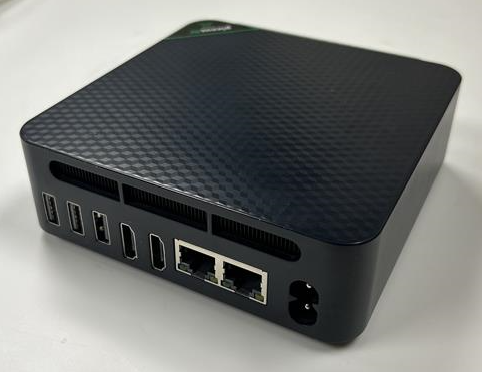
The PC is shown above. By default the unit should automatically boot up when power is reconnected to the device. If this is not happening the instructions are below to verify the BIOS power recovery settings.
Configure AC power Loss Recovery Behavior in BIOS
- Wire PC to power, network, keyboard, display
- Power on PC and repeatedly tap delete, to enter BIOS configuration
- Set Mini PC power recovery option to
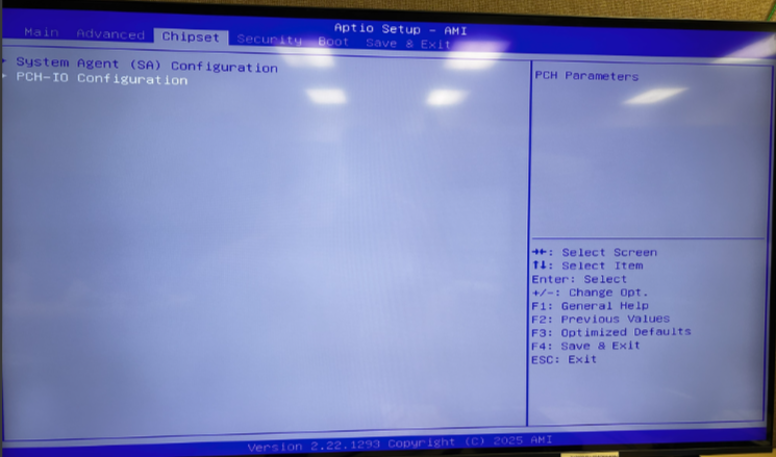
- Arrow over to Chipset tab in BIOS
- Select PCH-IO Configuration
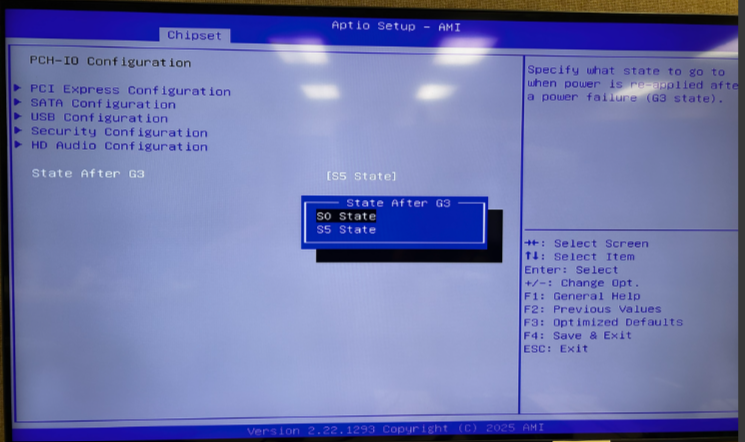
- State After G3 (G3 = mechanical shutoff)
- Configure to S0 (S0 = on state)
Was this article helpful?
That’s Great!
Thank you for your feedback
Sorry! We couldn't be helpful
Thank you for your feedback
Feedback sent
We appreciate your effort and will try to fix the article