P-AVN-4 Devices can be configured for Daisy Chaining. To enable Daisy Chaining, go to:
Administration -> Network -> Configure Daisy Chain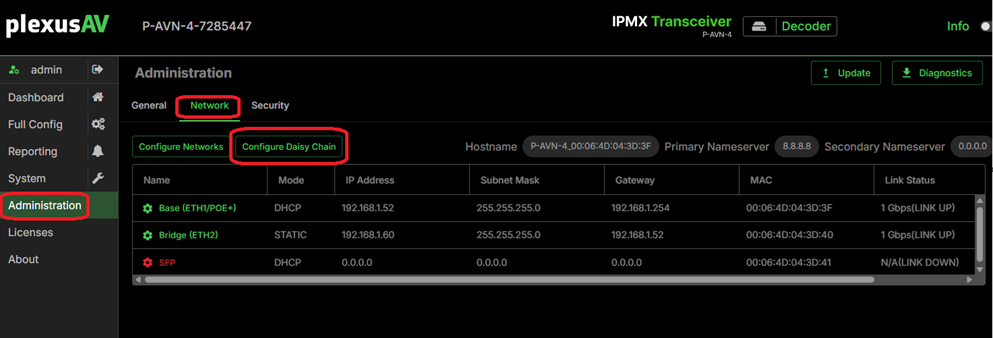
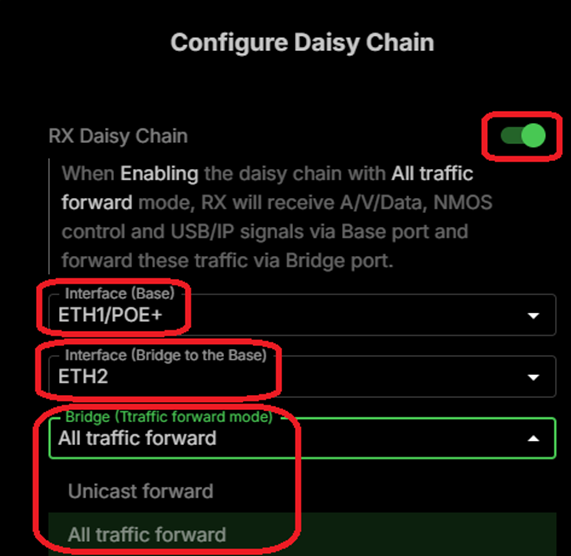
Forwarding is based on:
- Base Network Interface: the interface receiving the audio / video
- Bridged Network Interface: the interface forwarding the audio / video
You can choose between “Unicast Forward” or “All Traffic Forward”. “All Traffic Forward” includes Multicast Traffic and “Unicast Forward” does not. Multicast is typically used for Audio and Video.
You don’t need to assign an IP address to the Bridge Interface. An P-AVN-4 internal, virtual Ethernet switch connects it to the Base Interface when Daisy Chain is enabled.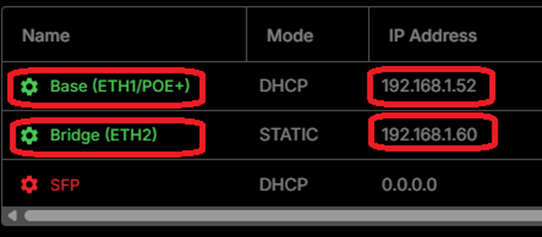
Daisy Chaining Audio / Video Considerations: In Daisy Chain mode it’s easy to oversubscribe the 1Gbs Ethernet links between the P-AVN-4’s. This can happen if you route the daisy chained receivers to different streams.
Our recommendation:
- JPEG-XS (Lite Compression): route all daisy chained receivers to the same stream
- H.26x (High Compression): route all daisy chained receivers to a maximum of 10 different streams
- Make sure that a user cannot oversubscribe the links e.g. by programming routing restrictions in your Control System.
- Limit the number of Daisy Chaining receivers to 16
Warning: Do not connect the Base and Bridge port to the same Ethernet Switch. This will effectively cause a network loop resulting in network congestion and potential failure.
Was this article helpful?
That’s Great!
Thank you for your feedback
Sorry! We couldn't be helpful
Thank you for your feedback
Feedback sent
We appreciate your effort and will try to fix the article