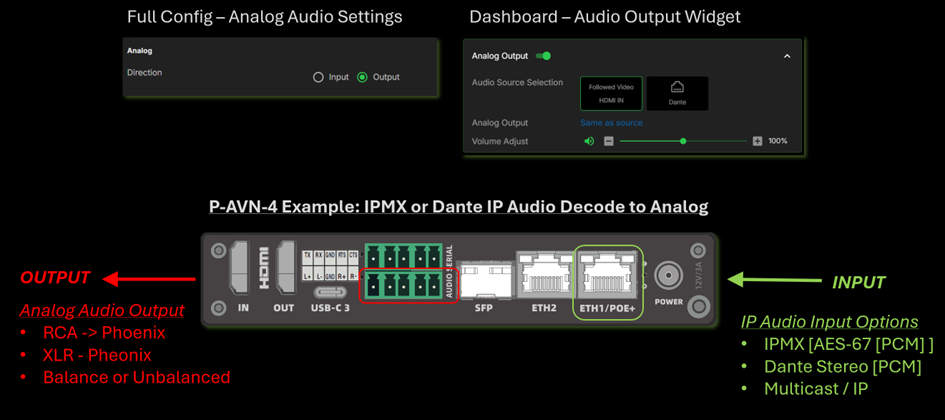
P-AVN-X Devices have a 5-PIN phoenix port for balanced or unbalanced audio wiring. Previously the analog port was fixed as Input for Encoder Mode, Output for Decoder Mode. Now the direction of the analog audio port can be configured for either direction on both Encode and Decode modes.
To set direction of analog I/O
- Open Dashboard of P-AVN-X web-interface
- Click on Full Config in the navigation panel
- Select analog direction and click apply
Note: The Dashboard widgets will change when analog direction is changed
- Analog = Input when Audio Input selection for the encoder will show Analog option
- Analog = Output when Analog Output Widget will be shown on the right side of Dashboard
P-AVN-4 Encoder Mode: Example of Analog Audio Encoding
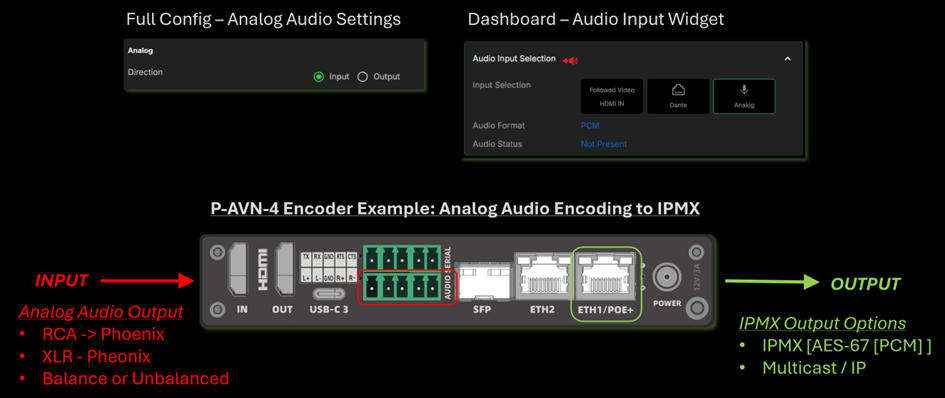
P-AVN-4 Encoder Mode: Example of Analog Audio Encoding
Was this article helpful?
That’s Great!
Thank you for your feedback
Sorry! We couldn't be helpful
Thank you for your feedback
Feedback sent
We appreciate your effort and will try to fix the article